
To import an inspection template using a CSV file, the file must be formatted correctly to ensure all questions are created as expected.
Download the CSV Template
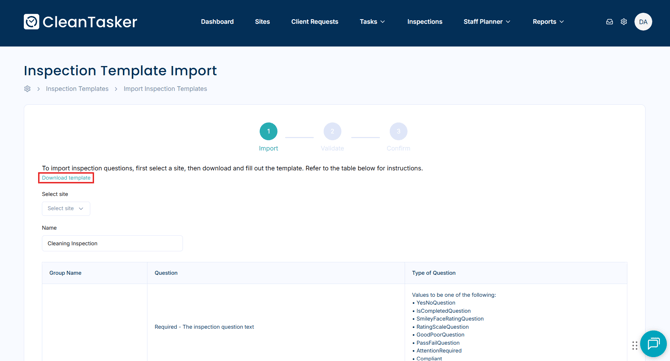
On the Inspection Template Import page, there is a downloadable CSV template available.
It is recommended to use this template, as it is already formatted correctly and includes the required columns.
CSV File Requirements
- The file must be saved in .CSV (Comma Separated Values) format
- Each row represents a question
- Each column represents a field for that question
Required Columns
Your CSV file should include the following columns:
| Group Name | Question | Type of Question |
|---|---|---|
| Optional |
Required - The inspection question text |
• YesNoQuestion • IsCompletedQuestion • SmileyFaceRatingQuestion • RatingScaleQuestion • GoodPoorQuestion • PassFailQuestion • AttentionRequired • Compliant |
Example CSV Format
| Group Name | Question | Type of Question |
|---|---|---|
| Kitchen | Mopped floors | YesNoQuestion |
| Kitchen | Bins emptied | YesNoQuestion |
| Bathroom | Bathrooms clean | Compliant |
Question Types
Ensure the Question Type values match the available options in the system:
- YesNoQuestion
- IsCompletedQuestion
- SmileyFaceRatingQuestion
- RatingScaleQuestion
- GoodPoorQuestion
- PassFailQuestion
- AttentionRequired
- Compliant
Grouping Questions
- To group questions, enter the same Group name for multiple questions
- Groups will be created automatically during import
- If no group is specified, the question will be added without a group
Before Uploading
- Check there are no empty rows in the file
- Ensure all required columns are completed
- Confirm the file is saved as a .CSV
Importing the File
Once your CSV file is ready, return to the inspection template creation screen and follow the steps in the How to create an Inspection Template article to import your file.