
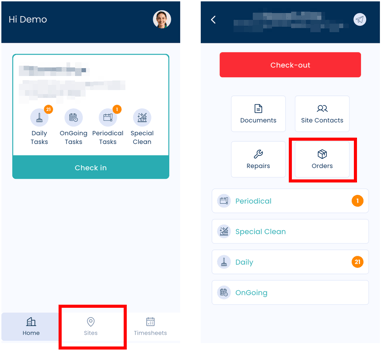
1. Go to the Sites Page
-
Tap the Sites tab at the bottom of the screen.
-
Select the relevant site where the supplies are needed.
2. Open Orders
-
Within the selected site, tap Orders.
3. Select Items and Quantity
-
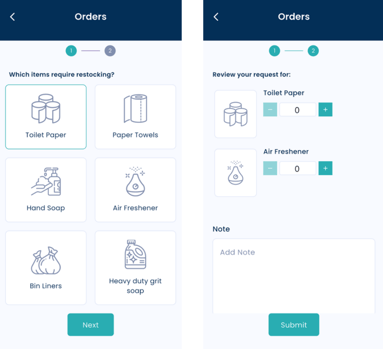
Choose the required items.
-
Enter the quantity needed for each item.
Make sure the quantities are accurate before proceeding.
4. Submit the Order Request
-
Tap Submit to send your request.
Once submitted, an email notification with the order details will be sent to the relevant managers for review.
Important Notes
-
You do not need to be checked in to submit a commodity order request.
-
Double-check the selected site before submitting to ensure the order is sent to the correct location.